FAQ
I am being told I don't have access to the file system path
By default, JoyDX restricts write access to your local file system using the workspace path (default `$HOME/joydx-workspaces`), shared asset path (default `$HOME/.local/share/joydx`), and `/tmp/joydx` (used to store runtime state markers).
If you would like to JoyDX to have write access to separate paths, change the `core -> osfs_whitelist` configuration option from the Advanced Settings to include your missing path.
How much does it cost?
JoyDX is free with usage limitations. There is a limit of 3 tracked apps, 3 environment instances, and 10 organisation assets. Once you reach the limit, your ability to add new without deleting old will be restricted
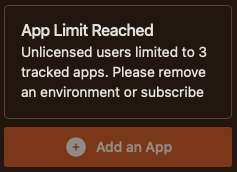
At that point, you are considered a professional user and need to acquire a license.
When I try to make use of remote repositories, I am told the remote cannot be found
JoyDX has an integration service allowing it to work with GIT providers. Depending on the platform URL and authentication methods you have associated with your Version Control System (VCS) accounts, JoyDX will attempt to calculate the appropriate checkout URL.
If you are accessing the VCS on a custom domain, go to `Settings -> External Services`, select your account and change the platform URL appropriately.
- The default platform URL for Github is `github.com`. When you use the repository address `https://github.com/joy-dx/todo-go-gin-api` and have SSH checkout configured for your account, the checkout address will be automatically converted to `git@github.com:joy-dx/todo-go-gin-api.git`
- If hosting github enterprise on a custom domain such as `vcs.mycompany.com` you should use `vcs.mycompany.com` as the platform URL
Why does JoyDX need certain permissions to my Github account?
JoyDX requires and makes use of the following permissions
- repoFor managing pull requests
- read:orgFor managing repositories within an organisation
- read:userFetching information about the logged in user
- write:public_keyFor automatically managing and rotating security keys
App Analysis seems to never end
The first time you run the app analysis service, it may take a while because JoyDX will need to setup the appropriate tooling. Similarly the first time using app analysis on a different programming language, expect it to take a little longer.
You can check if this is the case via the "Current Jobs" widget